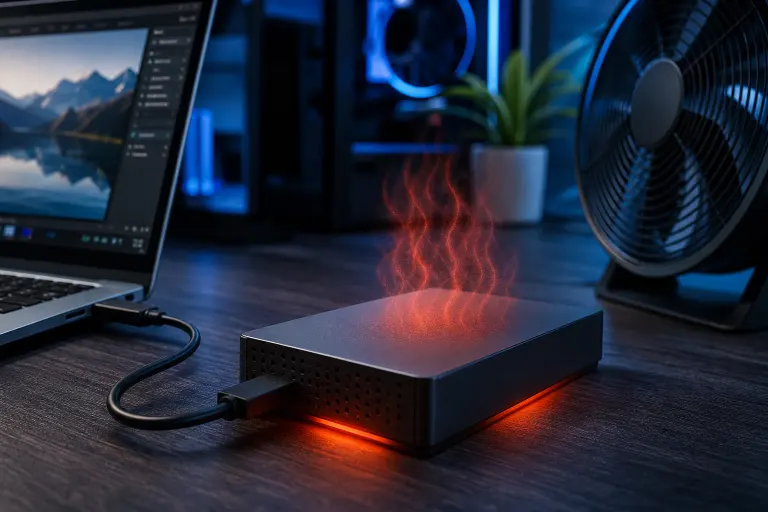
Why Is My External Hard Drive Getting Hot During Use?
TL;DR: External hard drives generate heat during normal use, but excessive heat, especially during light activity or at idle, points to a ventilation problem, drive failure, or enclosure issue. Sustained high temps shorten drive life and can cause data loss. The fix depends on identifying the source.
What Happened
You picked up your external drive mid-transfer and it was uncomfortably hot to the touch. Or maybe it has always run warm but lately it seems worse. Either way, something changed or was never quite right.
External hard drives, particularly spinning platter (HDD) drives, produce heat as a byproduct of the motor spinning at 5,400 or 7,200 RPM and the read/write heads moving across the platter. That is normal. The enclosure around the drive is supposed to dissipate that heat passively.
SSDs in external enclosures run cooler but can still overheat if the enclosure traps heat or if the drive is working hard on sustained writes.
The problem is when the heat becomes excessive. Most 2.5-inch portable drives are designed to operate between 0°C and 60°C (32°F to 140°F). Consumer enclosures rarely have active cooling, so they rely entirely on airflow and the enclosure material to shed heat. When that system breaks down, temperatures climb.
Why It Matters
Heat is one of the leading causes of mechanical hard drive failure. Here is what actually happens when a drive runs too hot for too long:
- Lubricant degrades. The spindle motor bearings rely on lubricant that breaks down at elevated temperatures, increasing friction and wear.
- Platters expand. Thermal expansion changes the geometry of the platter surface, making accurate head positioning harder.
- Read/write errors increase. The drive firmware may start retrying reads and writes more often, which you notice as slowdowns or strange pauses.
- Sudden failure becomes more likely. Once a drive starts failing from heat damage, recovery is not guaranteed and can be expensive.
For SSDs, sustained heat accelerates NAND wear and can trigger thermal throttling, which tanks transfer speeds.
If your drive holds backups, photos, business files, or anything you cannot easily recreate, heat is a data-loss risk you should take seriously.
Common causes ranked by likelihood
- Poor placement. The drive is sitting on carpet, fabric, or another surface that blocks airflow under the enclosure.
- Enclosure quality. Budget enclosures use plastic that insulates rather than dissipates heat. Better enclosures use aluminum.
- High ambient temperature. A desk in direct South Florida sun, or a room without AC, pushes baseline temps up before the drive even starts working.
- Heavy sustained workloads. Backing up hundreds of gigabytes continuously stresses any drive. This is expected but worth managing.
- Drive age or early failure. A failing drive often works harder to complete basic reads, generating more heat in the process.
- USB power delivery issues. Some bus-powered drives draw more current when the cable or port is marginal, which translates to heat.
Computer acting up? Get a real diagnosis. Book a diagnostic
What We Don't Know Yet
Without connecting the drive to a diagnostic tool, you cannot tell whether the heat is purely environmental or whether the drive itself is starting to fail. The two feel identical from the outside.
You also cannot know the drive's actual internal temperature from touch alone. A case that feels hot may still be within spec if it is an aluminum enclosure doing its job. A case that feels only warm might be masking a drive running at its limit internally.
If the drive is making new sounds, clicking, grinding, or taking longer than usual to show up after you plug it in, those are separate warning signs that heat alone does not explain. At that point the drive internals are the concern, not just cooling.
What to Do About It
Step 1: Check actual drive temperature
Install CrystalDiskInfo (Windows, free) or use DriveDx (Mac). Connect the drive and read the SMART temperature value. If you see above 50°C at idle or above 60°C under load, you have a real problem, not just a warm enclosure.
Step 2: Improve airflow immediately
- Move the drive off carpet or fabric onto a hard surface.
- Keep it elevated slightly so air can circulate underneath.
- Move it away from other heat sources: power strips, laptops, direct sunlight.
- If your workspace in West Palm Beach or the Treasure Coast runs warm, air conditioning matters more than you think for hardware longevity.
Step 3: Evaluate the enclosure
If you bought a cheap plastic enclosure, consider replacing it with an aluminum one. Aluminum conducts heat away from the drive significantly better than plastic. This is an inexpensive fix if the drive itself is healthy.
Step 4: Back up before you do anything else
If the drive is already hot and holding important data, copy everything off it before you troubleshoot further. Do not wait. A drive showing heat stress is a drive that may not survive the next transfer session.
If you need a reliable backup strategy, Fix My PC Store's backup and disaster recovery service is worth a look, especially if you are managing business files.
Step 5: Decide whether professional diagnosis makes sense
- Self-help is appropriate if SMART temps are normal, the enclosure is plastic, and moving the drive to a better surface fixes the issue.
- Bring it in if the drive is clicking, dropping off USB, showing SMART errors, or you have already tried the basics and it is still running hot.
Fix My PC Store handles computer repair and data recovery diagnostics from our Okeechobee Boulevard location serving West Palm Beach, Royal Palm Beach, and Wellington. If the drive is failing, catching it early gives you better options.
For a remote assessment of what your SMART data shows, remote support is also available.
Heat is a predictable problem with a predictable solution, as long as you act before the drive decides it is done working.
Computer acting up? Get a real diagnosis.
Fix My PC Store has repaired thousands of machines across West Palm Beach. Honest pricing, no upsell games, and a free diagnostic for new customers with our email coupon.