Back to Blog
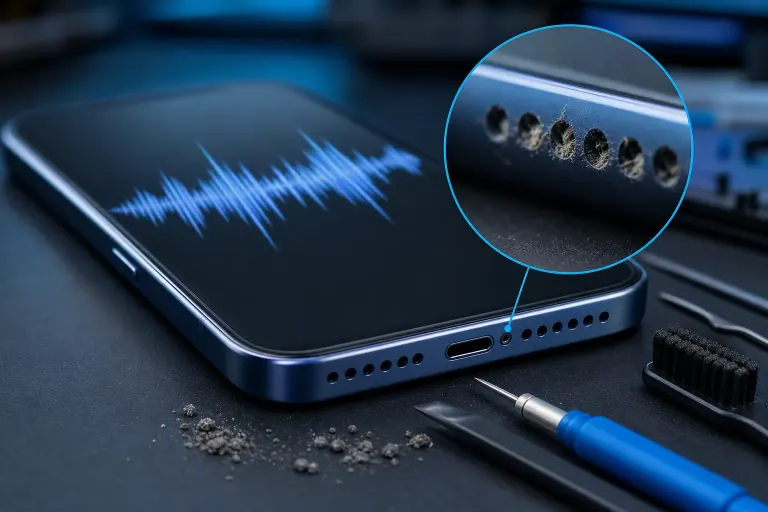
    Smartphone with clogged speaker grille magnified in inset, audio waveform on screen, cleaning tools and debris nearby.

    Phone Speaker Muffled or Distorted? Real Fixes That Work

    mobile-repair
    phone-speaker
    phone-troubleshooting
    iphone-repair
    android-repair
    Author: Fix My PC Store Editorial TeamPublished: 8/22/2026Last Updated: 8/22/2026

    A muffled or distorted phone speaker usually comes down to dirt, software, or hardware damage. Here's how to test each one step by step so you know exactly what's wrong before you fix it.

    TL;DR: Most muffled or crackly phone speakers are caused by trapped dust, a stuck volume setting, a software glitch, or actual speaker damage from moisture. Work through the cleaning and software checks first, and if the sound is still bad, it's probably time for a hardware look.

    Hey, I know how annoying this is. You're trying to hear a voicemail or watch a video, and everything sounds like it's coming through a tin can. Don't worry, we're going to figure out exactly what's going on together. Most of the time this is fixable, and even when it's not a quick fix, at least you'll know for sure instead of guessing.

    What you need

    You don't need much for this, which is the good news.

    • A soft-bristled toothbrush or a clean, dry small paintbrush
    • Compressed air (a can, or a bulb blower if you have one)
    • A toothpick or SIM eject tool (plastic is safer than metal)
    • A charging cable to check for updates
    • A quiet room to test sound clearly
    • Patience. Seriously, don't rush the cleaning step

    If you don't have compressed air on hand, that's fine. We'll cover a workaround below.

    Step 1: Figure out which speaker is acting up

    Phones actually have more than one speaker, and knowing which one is the problem tells you a lot.

    Make a regular phone call and put it on speakerphone. Then play a song or video with speakerphone off, using the main media speaker. Notice if the muffling happens in one, the other, or both.

    • If it's just during calls, the earpiece speaker (the tiny one near the top of the screen) is likely the culprit.
    • If it's just media and ringtones, it's the bottom or side firing speaker.
    • If it's both, it might be a broader software issue, a case problem, or something affecting the whole audio system like a bad update or moisture in the charging port area.

    Write down what you notice. This will save you time later, especially if you end up needing a professional opinion.

    Cracked screen or a phone that won't hold a charge? Get a repair quote
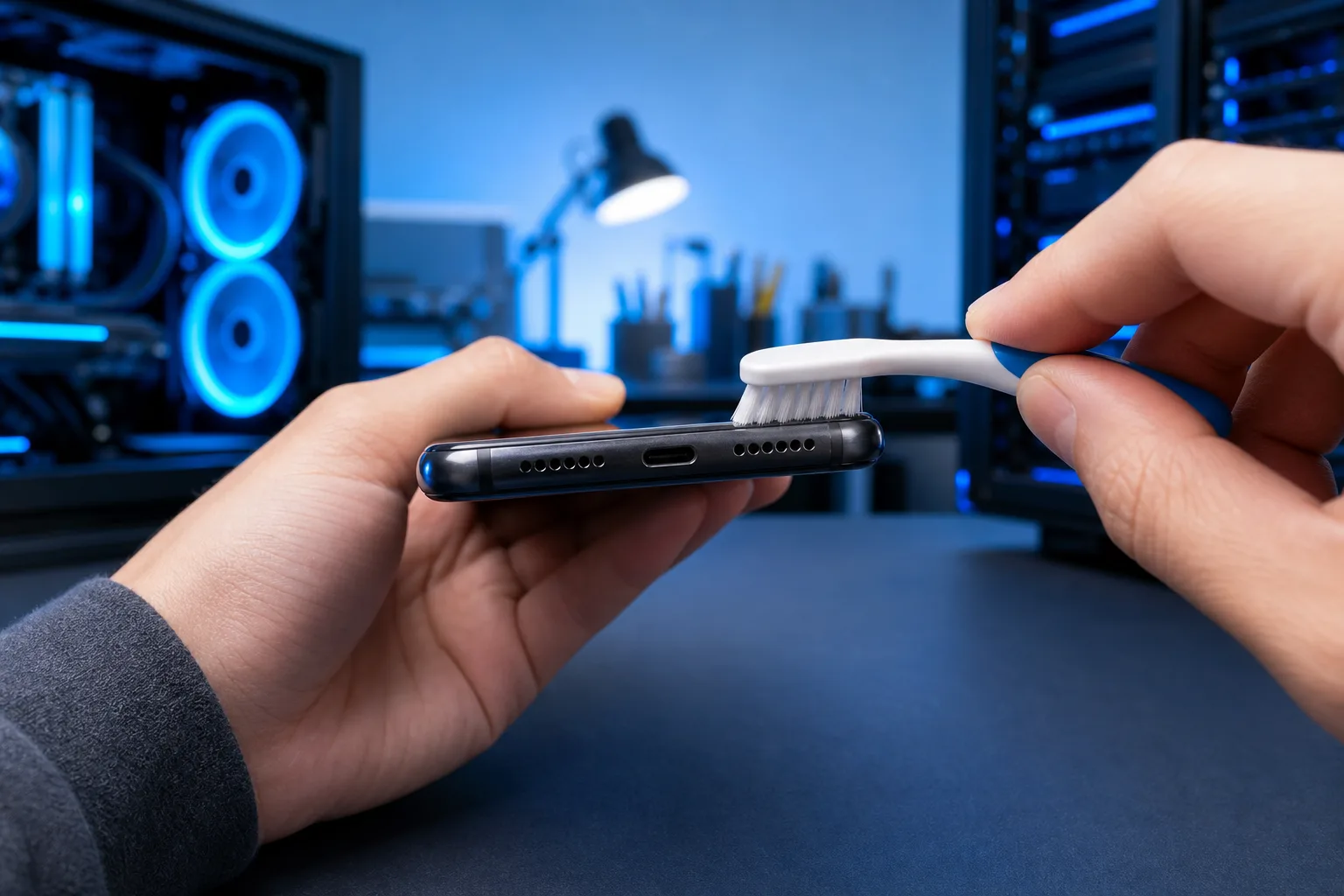
    Hands cleaning a smartphone's USB-C port and speaker grille with a small white soft-bristled brush in a blue-lit tech workspace.
    Brushing outward across the speaker grille is one of the most effective fixes for muffled phone audio.

    Step 2: Check the obvious stuff first

    I promise this isn't me being condescending, this step catches more problems than people expect.

    • Take the phone out of its case completely. Some cases, especially thick or cheap ones, cover speaker grilles just enough to muffle sound without you noticing.
    • Check if a screen protector or an accessory (like a PopSocket) is blocking the speaker.
    • Make sure a Bluetooth device isn't secretly connected. If your phone thinks it's talking to your car or earbuds, sound can get routed strangely even if nothing is paired to your ears right now.
    • Turn the volume all the way up, then back down, to rule out a stuck volume slider.

    Did any of that fix it? If so, great, you're done, and it took five minutes. If not, keep going, we're not out of options yet.

    Step 3: Clean the speaker grille properly

    This is the single most common fix for muffled sound, especially if you work outside, go to the beach, or carry your phone in a pocket with lint, sand, or dust.

    1. Power off the phone. This isn't strictly required, but it avoids accidental button presses and it's safer around any moisture from your breath or cleaning tools.
    2. Look closely at the speaker grille with good lighting. You're looking for a fuzzy or gray film. That's usually pocket lint packed into the mesh.
    3. Use the soft brush at a low angle, brushing outward, not pushing into the holes. Pushing debris deeper is the mistake that makes people call us more than anything else.
    4. Use short bursts of compressed air held a few inches away. Angle the can so air comes out at a slight angle across the grille, not straight in.
    5. If you don't have compressed air, gently tap the phone speaker-side down against your palm a few times. It sounds too simple, but it genuinely helps knock loose debris.
    6. Turn the phone back on and test with a call and a video.

    How's it sound now? A lot of the time, this alone clears things right up.

    Step 4: Rule out software problems

    If cleaning didn't help, software could be the reason, and this happens more than people realize.

    • Restart the phone completely. Not just lock and unlock, a full power cycle.
    • Check for a pending OS update. Audio bugs do show up after certain updates, and manufacturers usually patch them within a release or two.
    • Open your equalizer or sound enhancement settings if your phone has them (common on Android). Someone, maybe even a past version of you, might have turned on a

    Cracked screen or a phone that won't hold a charge?

    Bring it in. Most phone and tablet repairs are same-day, with parts that actually last.
    Get a repair quote

    Frequently asked questions

    Why does my phone speaker sound muffled all of a sudden?

    The most common causes are dust or lint packed into the speaker grille, a case or accessory blocking the sound, a stuck volume or equalizer setting, or a recent software update causing a glitch. Water exposure and physical damage are less common but possible causes if cleaning and restarting don't help.

    Can I fix a muffled phone speaker myself?

    Yes, in many cases. Gently cleaning the speaker grille with a soft brush and compressed air, removing the case, and restarting the phone resolves the issue for a lot of people without any tools or repair needed.

    Is it safe to use a toothpick to clean my phone speaker?

    A plastic toothpick or SIM eject tool can work if you're gentle and go in at a shallow angle, but metal tools and aggressive digging can scratch the speaker or push debris deeper into the mesh. A soft brush and compressed air are safer first choices.

    How do I know if my speaker is water damaged?

    Water damage often causes a crackling or bubbling sound rather than just muffling, and it may come with other symptoms like a phone that won't charge properly or a screen that flickers. If your phone was recently exposed to moisture and the sound distortion started right after, water damage is a strong possibility.

    Will a factory reset fix a distorted speaker?

    It can, if the cause is software related, but it's a drastic step and you'll lose data unless you back everything up first. It's worth trying a simple restart and checking for updates before jumping to a full reset.

    When should I take my phone to a repair shop instead of fixing it myself?

    If cleaning and software checks don't resolve the muffling, or if the phone shows other signs of water exposure or physical damage, it's time for a professional diagnosis rather than guessing further and risking more damage.

    Frequently Asked Questions

    Why does my phone speaker sound muffled all of a sudden?
    The most common causes are dust or lint packed into the speaker grille, a case or accessory blocking the sound, a stuck volume or equalizer setting, or a recent software update causing a glitch. Water exposure and physical damage are less common but possible causes if cleaning and restarting don't help.
    Can I fix a muffled phone speaker myself?
    Yes, in many cases. Gently cleaning the speaker grille with a soft brush and compressed air, removing the case, and restarting the phone resolves the issue for a lot of people without any tools or repair needed.
    Is it safe to use a toothpick to clean my phone speaker?
    A plastic toothpick or SIM eject tool can work if you're gentle and go in at a shallow angle, but metal tools and aggressive digging can scratch the speaker or push debris deeper into the mesh. A soft brush and compressed air are safer first choices.
    How do I know if my speaker is water damaged?
    Water damage often causes a crackling or bubbling sound rather than just muffling, and it may come with other symptoms like a phone that won't charge properly or a screen that flickers. If your phone was recently exposed to moisture and the sound distortion started right after, water damage is a strong possibility.
    Will a factory reset fix a distorted speaker?
    It can, if the cause is software related, but it's a drastic step and you'll lose data unless you back everything up first. It's worth trying a simple restart and checking for updates before jumping to a full reset.
    When should I take my phone to a repair shop instead of fixing it myself?
    If cleaning and software checks don't resolve the muffling, or if the phone shows other signs of water exposure or physical damage, it's time for a professional diagnosis rather than guessing further and risking more damage.

    Share this article

    You May Also Like