Why Is My Gaming PC Showing High CPU Usage but Low GPU Usage?
TL;DR: High CPU usage with low GPU usage in games is the classic sign of a CPU bottleneck. Your processor can't prepare game logic and draw calls fast enough to keep your GPU busy. The fix depends on your CPU, the game, and your settings, so diagnose before you spend anything.
What Happened
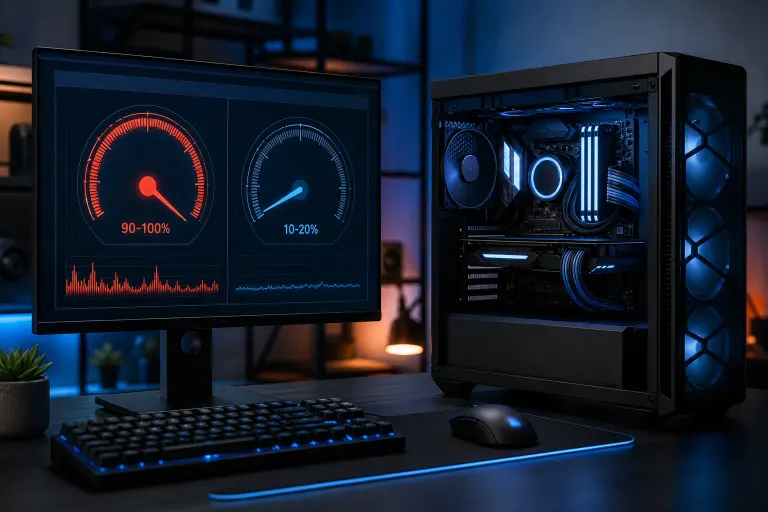
Your GPU sits at 40-60% load while your CPU cores are pegged near 100%. Frames feel choppy or capped well below what your GPU should deliver. This is a CPU bottleneck in action.
In a typical gaming frame, the CPU handles game logic, physics, AI, and draw calls. It then hands work to the GPU to render. If the CPU can't hand off work fast enough, the GPU literally waits. High CPU load plus low GPU load is the visible proof of that waiting.
Common causes at a glance:
| Cause | What's happening |
|---|---|
| Weak or aging CPU | Too few cores or low single-core speed for the game's demands |
| High frame rate target | At 1080p/high FPS, CPU work per frame dominates GPU work |
| CPU-heavy game type | Strategy, simulation, open-world games stress the CPU more |
| Background processes | Other apps stealing CPU cycles mid-game |
| Poor game optimization | Some titles are notoriously single-threaded |
| Thermal throttling | CPU overheats and drops clock speed mid-session |
Why It Matters
This bottleneck directly caps your frames per second. Your RTX 4070 or RX 7800 XT is not running at anything near its potential if the CPU can't keep it fed. You're leaving FPS on the table that you already paid for.
Resolution matters a lot here. At 1080p, the GPU finishes pixels fast and waits on the CPU constantly. At 1440p or 4K, the GPU has more pixel work per frame and the bottleneck often shifts back toward the GPU. If you're playing at 1080p and your CPU is older or lower-end, the bottleneck will show up hard.
Game genre matters too. An open-world RPG with hundreds of NPCs hammers CPU cores. A linear shooter with tight environments is gentler. The same PC can be CPU-bottlenecked in one game and GPU-bottlenecked in another.
Ready to build a rig that actually rips? Start your build
What We Don't Know Yet
Hardware monitoring tools give you load percentages but they don't tell you exactly which part of the CPU pipeline is the chokepoint. It could be single-threaded performance, memory latency, or a specific game thread hitting one core hard while others sit lighter.
Some games also have engine-level quirks. A CPU-heavy title might show high usage even on a strong processor because the game's threading is poor, not because your CPU is weak. Knowing your specific game's reputation helps interpret the numbers.
Thermal throttling is also easy to miss. A CPU running at 95°C will silently drop its clock speed, which looks identical to a true bottleneck. You need temperature data alongside load data to separate the two.
What to Do About It
Step 1: Monitor properly first. Use MSI Afterburner with RivaTuner or HWiNFO64 overlaid in-game. Watch CPU core usage per-core, GPU load, CPU temperature, and GPU temperature simultaneously. Do this for at least 10 minutes of active gameplay, not the main menu.
Step 2: Check for thermal throttling. If any CPU cores hit 95°C or above and your FPS dips at the same moments, the CPU is throttling. A repaste and better case airflow should come before any hardware upgrade.
Step 3: Kill background processes. Close your browser, Discord video, streaming software, and anything else before testing. Task Manager can reveal a background app quietly eating a full CPU core.
Step 4: Lower in-game CPU-heavy settings. Shadow draw distance, NPC density, and physics quality are CPU-driven in many engines. Dropping those while keeping GPU-heavy settings like texture quality high can rebalance the load.
Step 5: Try raising your resolution. If you're on 1080p and your GPU can handle it, bump to 1440p or enable DLSS/FSR at a higher output resolution. This shifts more work to the GPU and can reduce the bottleneck effect noticeably.
Step 6: Evaluate a CPU upgrade. If temps are fine, background processes are cleared, settings are adjusted, and you're still CPU-limited, the processor may genuinely be the weak link. Check the game's recommended CPU specs and compare your single-core benchmark scores using Cinebench or PassMark results for your chip. Upgrading the CPU makes sense if you're more than one generation behind on a socket you can still upgrade on the same motherboard.
If overclocking is on the table, squeezing more clock speed out of your existing CPU is a real option. Check out /media/video/is-overclocking-worth-it for a straight take on whether it's worth the effort.
If you want a custom build that's actually balanced for the games you play and the resolution you're targeting, the Fix My PC Store gaming PC wizard can help you spec it out without guessing. If your current machine needs a hardware check or you're not sure whether your CPU temps are normal, bring it by the shop at 10140 Okeechobee Blvd, West Palm Beach, or book a remote support session for a software-side diagnostic. Initial checks for most in-store visits are free.
Ready to build a rig that actually rips?
Custom gaming PCs built and tuned by people who game. Tell us your budget and target frame rate.