Water-Damaged Phone? What to Do in the First 30 Minutes
Listen to this article
TL;DR: If your water damaged phone just took a swim, your mission in the first 30 minutes is simple: kill the power, stop the corrosion clock, and avoid “helpful” DIY myths that make it worse. Do the right steps fast, and your odds of phone water damage recovery go way up.
Look, I’m not judging how your phone ended up in the pool, sink, or (my personal favorite) the toilet. Okay, maybe a little. My retro flip phone collection is judging you too, because those little tanks didn’t need “water mode” to survive. But here in 2026, we’re all carrying glass sandwiches packed with power. When water gets inside, it’s not the splash that kills it. It’s what happens next.
Why the First 30 Minutes Matter for a Water Damaged Phone
I see this all the time in Palm Beach County: someone drops their phone in water, dries the outside, turns it on to “check,” and then wonders why it’s dead by dinner. Here’s the science-y truth in plain English:
- Water + electricity = short circuits. If the phone is powered, current can jump where it shouldn’t.
- Water leaves minerals behind. Tap water, pool water, ocean water, coffee, soda, and “mystery bathroom liquid” all leave conductive residue.
- Corrosion starts fast. Once moisture and oxygen hit exposed metal, corrosion begins and keeps spreading even after the phone “seems dry.”
So yes, your phone can work for a few hours after getting wet and still fail later. That’s not magic. That’s corrosion doing cardio.
Water Damaged Phone: The First 30-Minute Rescue Plan (Step-by-Step)
Let me save you a headache. Do these steps in order. Don’t improvise. This is not the time for “TikTok repair school.”
Minute 0-2: Power Off Immediately (No “Just Checking”)
- Turn it off. If the screen is on, power down right away.
- If it’s already off, keep it off. Do not press buttons to see if it “still works.”
- Do not plug it in. Charging a wet phone is one of the fastest ways to turn mild liquid exposure into a motherboard problem.
If your phone won’t turn on after water, that can actually be a weird blessing. It may have protected itself, or the battery connection is compromised. Either way, don’t force it.
Minute 2-5: Remove What You Can (SIM, Case, Accessories)
- Take off the case. Cases trap water. Yes, even your expensive “waterproof” one.
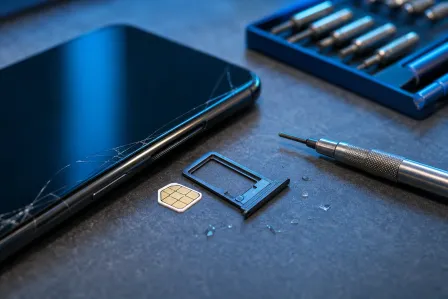
- Remove the SIM tray (and microSD card if your Android has one).
- Disconnect accessories like charging cables, headphones, and external mics.
Pro tip: If you have an Android with a removable back and battery (rare now, but they still exist), remove the battery. If you can’t remove the battery, don’t try to pry the phone open. That’s how I end up repairing your phone and your pride.
Minute 5-10: Dry the Outside Correctly (No Heat, No Shaking)
- Blot with a lint-free cloth or paper towel.
- Hold ports facing down so gravity helps water exit.
- Do not shake it. Shaking pushes liquid deeper.
- Do not use a hair dryer or heat gun. Heat can warp seals, damage screens, and bake minerals onto the board.
This is the phone repair equivalent of “turn it off and on again,” except the winning move is turning it off and leaving it alone.
Minute 10-20: Decide What Kind of Liquid You’re Dealing With
Not all liquids are equal. Your next move depends on what soaked the device:
- Fresh water (sink, rain): better odds, but still risky due to minerals.
- Salt water (ocean): corrosive and conductive. This is “get help fast” territory.
- Pool/hot tub: chlorine and chemicals accelerate damage.
- Coffee/soda/juice: sugars leave sticky residue that keeps corrosion going and can wreck buttons and speakers.
If it’s anything other than clean-ish fresh water, assume you need liquid damage repair sooner, not later.
Minute 20-30: Air-Dry the Smart Way (And Skip the Rice Myth)
Let’s address the myth I’ve “rescued” more phones from than I can count: rice. Rice is for dinner, not diagnostics.
- Do not bury your phone in rice. Rice dust can get into ports and doesn’t remove trapped moisture from under shields.
- Do use gentle airflow in a dry room: place the phone on a towel with ports angled downward.
- Do use silica gel packets (the little “do not eat” packs) if you have them. Put the phone in a container with silica, not touching loose debris.
Important: air-drying helps with surface moisture. It does not remove mineral deposits or stop corrosion once residue is inside. That’s why professional cleaning exists.
What NOT to Do If Your Phone Gets Wet (Common DIY Damage I See)
I’m going to say this like a friend who wants you to keep your money: most “quick fixes” make water damage worse.
- Don’t charge it “to see.” That’s how small corrosion becomes a short.
- Don’t use heat. Heat can damage batteries and soften adhesives that hold water seals.
- Don’t press every button. You can push liquid into switches and membranes.
- Don’t freeze it. Condensation is not your friend.
- Don’t assume IP ratings mean invincible. Water resistance degrades with drops, time, and repairs.
If you want a manufacturer-level reality check on water resistance claims, read Apple’s guidance on iPhone liquid exposure and water resistance and Google’s Pixel water resistance notes. Both basically say: “We tried, but don’t push it.”
Moisture Indicators (LCI): What They Tell Us and What They Don’t
Many phones have Liquid Contact Indicators (LCIs) near the SIM tray or inside the device. They typically change color (often white to red/pink) when exposed to liquid.
- LCI can confirm exposure but it doesn’t show how far liquid traveled.
- LCI doesn’t measure severity. A tiny splash can trigger it, and a serious internal soak might miss a specific indicator location.
- LCI is not a repair plan. It’s a clue, not a cure.
So if you peek in the SIM tray and see color change, don’t panic. Just treat it seriously and move to the next step: cleaning and inspection.
When to Stop DIY and Get Professional Liquid Damage Repair
If you’re in West Palm Beach, Palm Beach Gardens, Lake Worth Beach, Boynton Beach, Wellington, Royal Palm Beach, Jupiter, or anywhere else in Palm Beach County, here’s my honest rule:
- Salt water or pool water: go pro immediately.
- Sticky liquids (soda, coffee, juice): go pro soon, even if it “works.”
- Phone got wet and now it’s glitchy: flickering display, ghost touches, hot phone, no audio, Face ID/Touch ID issues, random reboots. That’s internal trouble.
- Phone won’t turn on after water: stop trying. Inspection time.
At our smart device repair service, proper liquid damage repair is not “spray and pray.” It’s controlled disassembly (when safe), corrosion cleanup, inspection under magnification, and testing. For iPhone-specific issues, start here: iPhone water damage repair and diagnostics. If your “phone” is actually an iPad that took a bath (it happens), use iPad repair for liquid damage. And for the Samsung crowd (yes, I’ll fix it even if you tease iOS users), book Samsung liquid damage repair.
What Happens During Corrosion Cleanup (And Why It Saves Phones)
Corrosion cleanup is the part most people skip, and it’s the part that often determines whether the phone lives.
What pros do that “air drying” can’t
- Remove shields and inspect the board for corrosion around power circuits, connectors, and charging paths.
- Clean residue properly using electronics-safe solvents and tools (not household cleaners).
- Check for damaged components and test critical lines before applying full power.
- Prevent delayed failure by stopping corrosion that would keep spreading.
Think of it like this: drying removes the puddle. Cleaning removes the “rust starter kit” left behind.
Realistic Expectations: Can a Water-Damaged Phone Be Saved?
Sometimes yes. Sometimes no. Anyone promising a 100% save rate is selling you a fairy tale (and probably also a bag of rice).
Best-case outcomes
- Phone powers on normally after proper cleaning and drying.
- Minor parts (speaker, charging port, cameras) need replacement, but data is intact.
Worst-case outcomes
- Severe board damage or battery damage prevents safe power-up.
- Corrosion ate through tiny connections under chips (this is where board-level work comes in).
Timing matters: the faster you stop power and get proper cleaning, the better your odds. Waiting days while “it dries” is like ignoring a small leak in your roof. It does not get better.
Data Recovery After Water Damage: Your Best Shot
Let’s talk about what you actually care about: photos, texts, notes, and the 9,000 screenshots you swear you’ll sort later (my flip phones are judging your screen time report right now).
If the phone still turns on
- Do not charge it yet if you suspect moisture in the port.
- If it’s stable on battery power, back up immediately using iCloud (iPhone) or Google backup (Android), or a computer if you can do it safely.
- Keep usage minimal. Heat from heavy use can accelerate corrosion and battery risk.
If the phone won’t turn on after water
- Don’t keep trying to boot it. Repeated attempts can worsen shorts.
- Professional inspection first. The goal is safe power restoration long enough to extract data, when possible.
Data recovery after water damage is often about stabilizing the device, not “fixing everything perfectly.” Sometimes we aim for “get it on, get the data, then decide if it’s worth full repair.”
Palm Beach County Water Damage Reality Check (Humidity Counts)
Living in South Florida means humidity is basically a lifestyle. Even after the initial dunk, moisture can linger in ports and crevices longer than you’d expect. If you’re in Palm Beach County and your phone was exposed to water, don’t treat it like a dry-climate problem. Get it assessed sooner, especially if you rely on it for work, school, or navigation (because nobody wants to be stranded with 2% battery and no signal on Okeechobee Boulevard).
Quick Checklist: What to Do If Phone Gets Wet
- Power off immediately
- Remove case, SIM tray, accessories
- Blot dry, ports facing down
- No charging, no heat, no rice
- Air-dry with gentle airflow
- Get professional liquid damage repair if it was salt/pool/sticky liquid, or if anything acts weird
Need Expert Mobile Device Repair?
Get professional iPhone, iPad, and Samsung repair from Palm Beach County's trusted mobile device specialists.
Get Device Help